Tools · crypto cards
Tria Card review 2026: the self-custodial Visa card
Updated 17 October 2026 · Tested on the live app for CryptosBeginner
You hold the keys, not Tria, not a bank. Up to 6% cashback across three membership tiers, real fee tables captured inside the app, nine supported networks, and honest notes on the rough edges. Here is the full Tria breakdown.
Alex Rivera · Crypto researcher, CryptosBeginner
Every review is research-led: specs, fees, and availability are checked against official sources before publication and re-checked on every update. Affiliate links never influence verdicts. Last reviewed 17 October 2026.
What Tria is
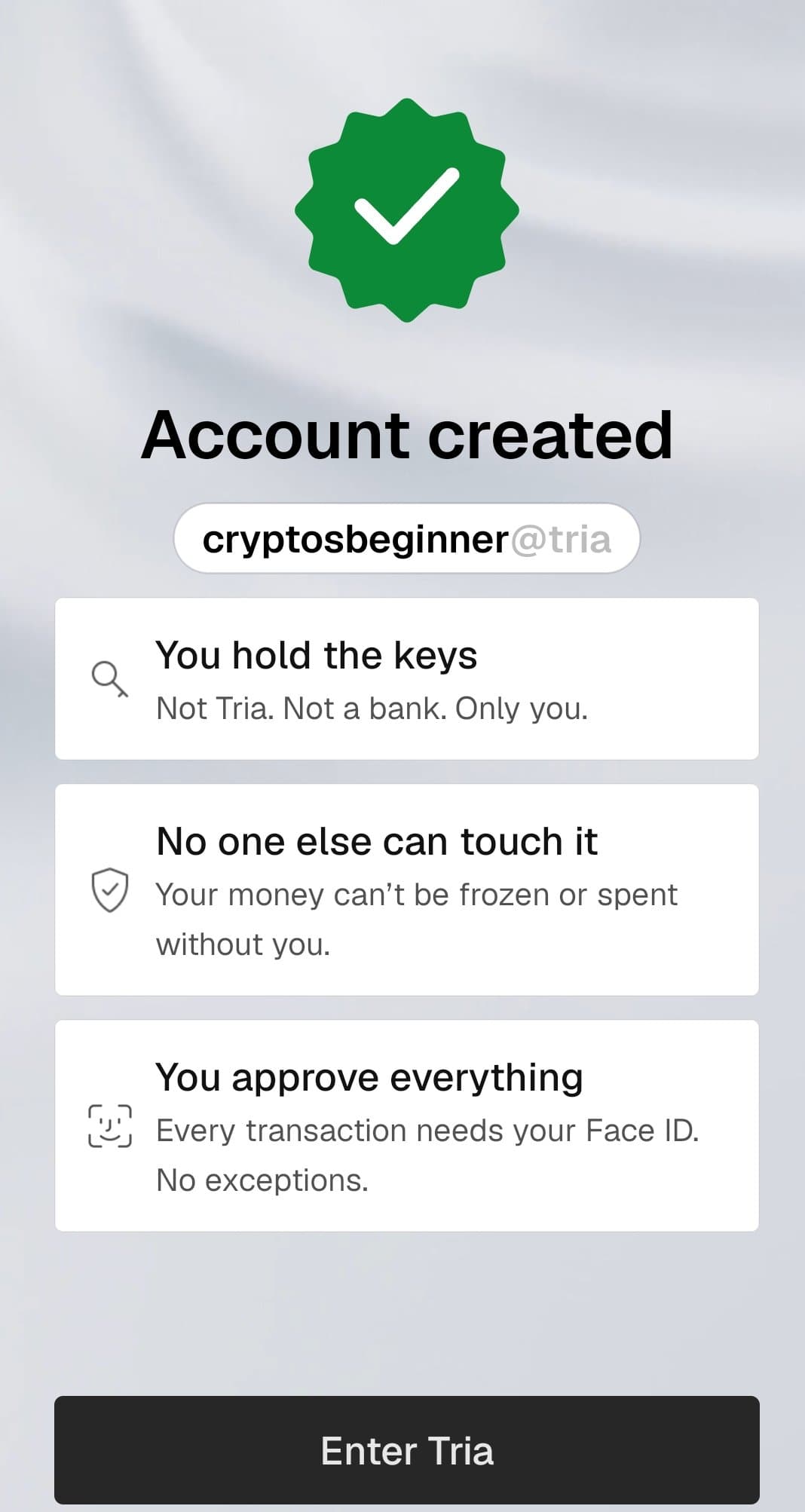
Tria is a self-custodial crypto neobank built around a Visa card. That self-custody claim is the headline feature: when you create an account, the app tells you plainly that you hold the keys, not Tria, not a bank, only you. Your money cannot be frozen or spent without you, and every transaction needs your Face ID approval, with no exceptions. Most crypto card apps are custodial, meaning the company holds your balance. Tria puts the keys in your hands instead.
Beyond the card, the app packs in a wallet with deposit, send, and swap, a futures trading tab, an earn section, travel bookings with cashback, a referrals program with points, and agentic trading keys for developers. The home screen walks you through three steps to your first dollar in motion: create your account, activate your card, then deposit to the card and make your first transaction.
Membership tiers: Lite, Pro, and Max
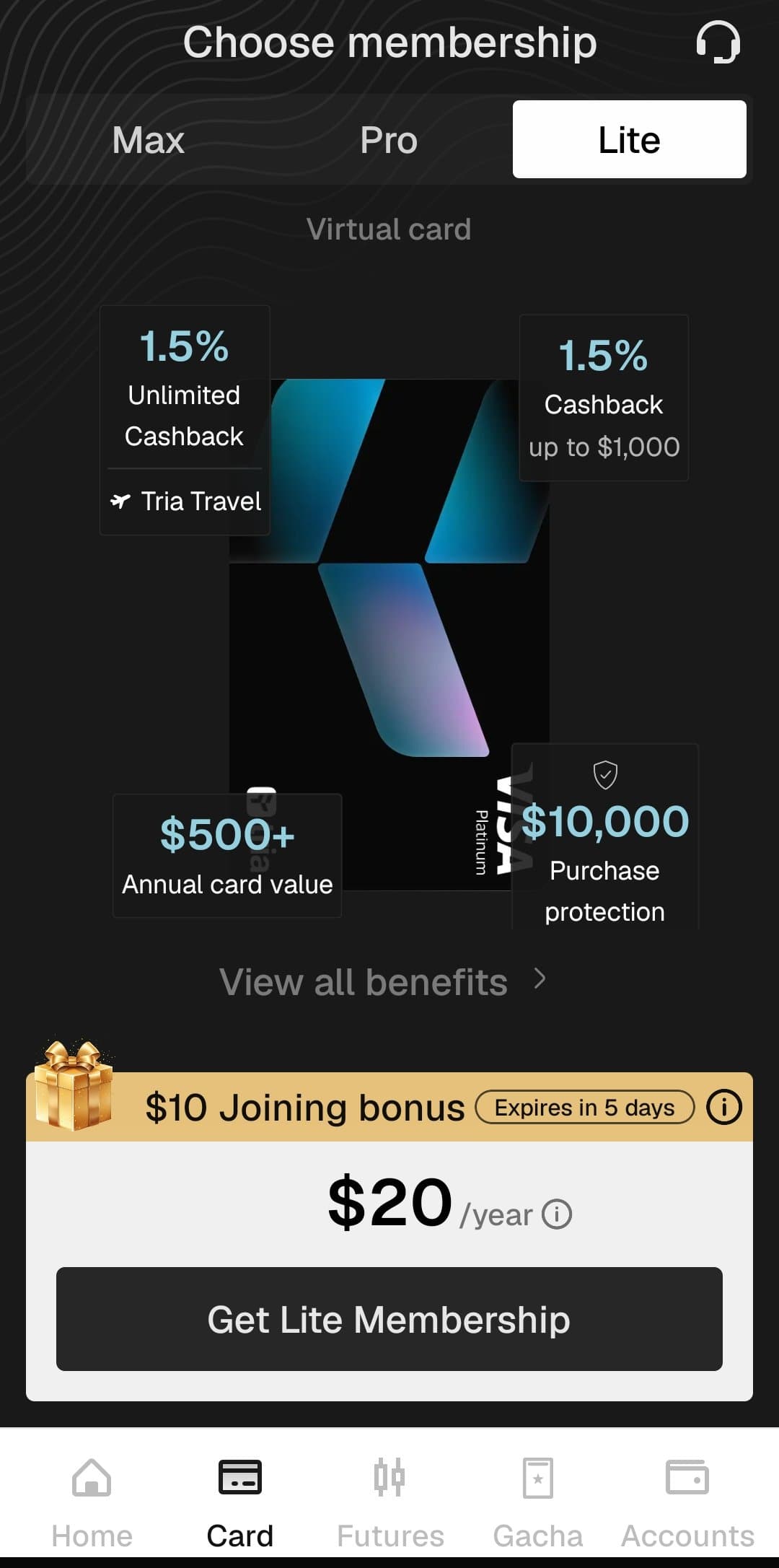
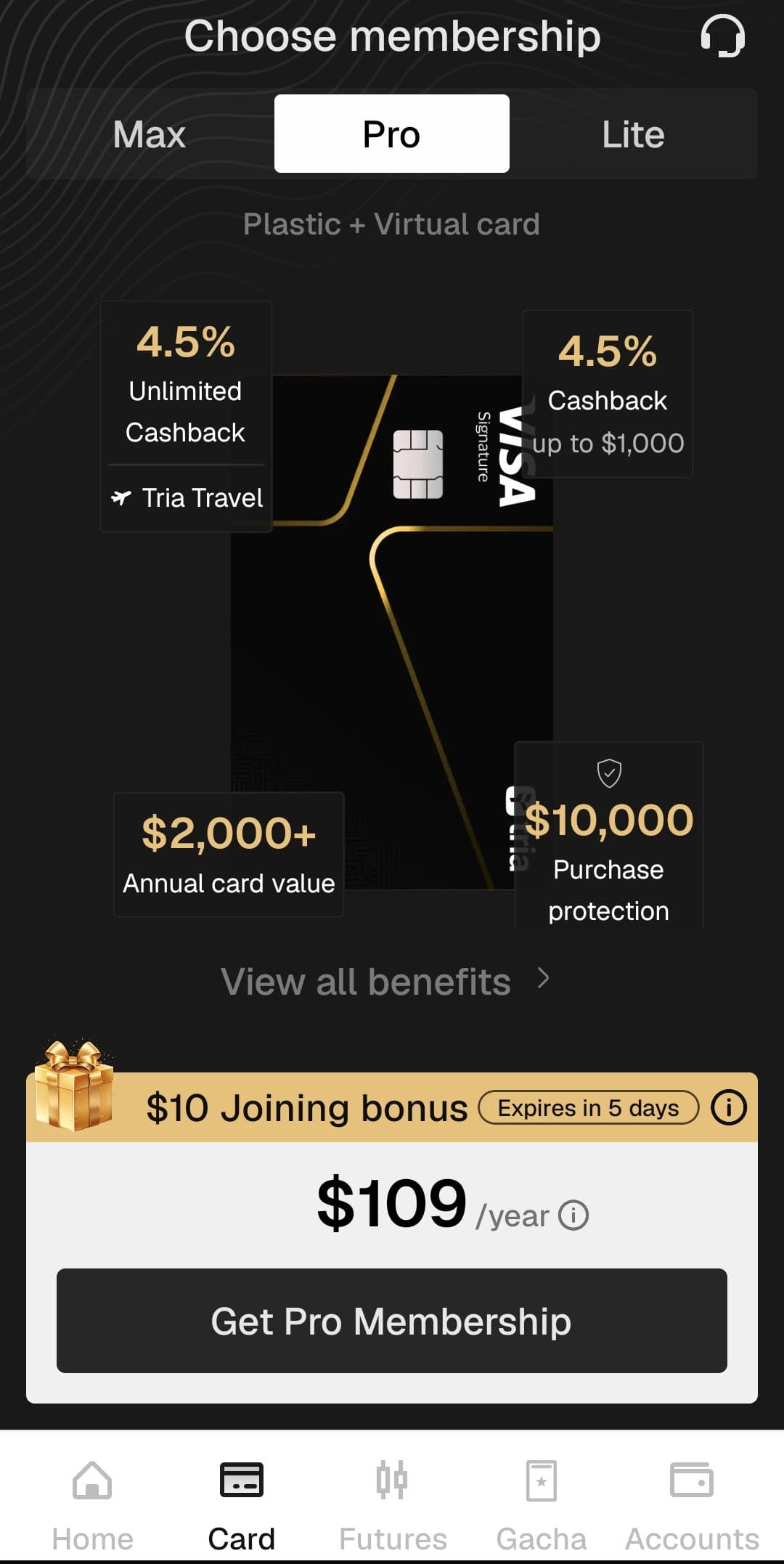
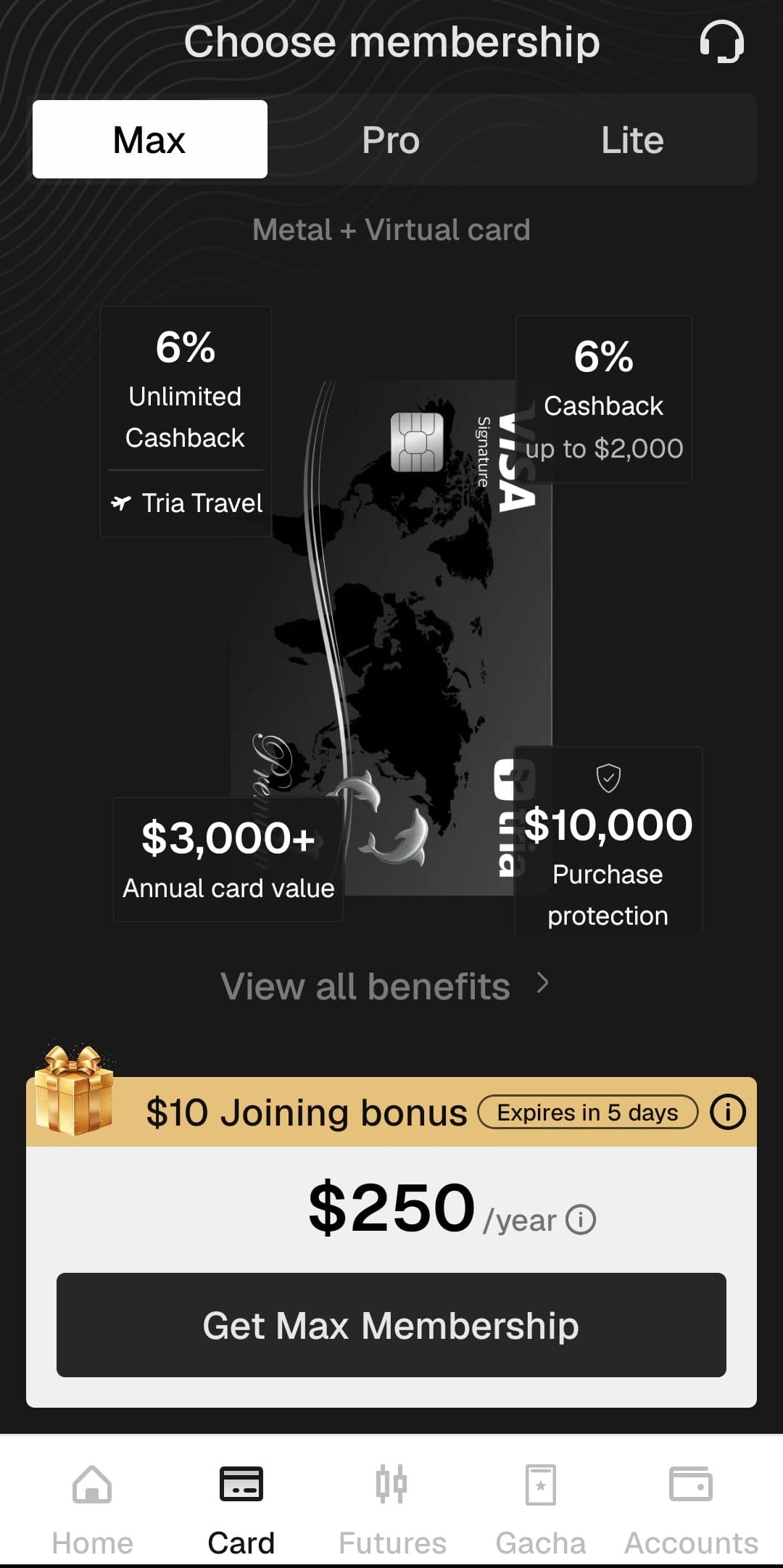
Tria sells the card through three annual memberships. The tier sets your cashback rate, your card format, and your perks. Here are the numbers captured in the app.
| Membership | Yearly price | Card format | Boosted cashback | After the cap |
|---|---|---|---|---|
| Lite | 20 USD | Virtual card | 1.5% on first 1,000 USD/month | 0.5% unlimited |
| Pro | 109 USD | Plastic + virtual card | 4.5% on first 1,000 USD/month | 1% unlimited |
| Max | 250 USD | Metal + virtual card | 6% on first 2,000 USD/month | 1% unlimited |
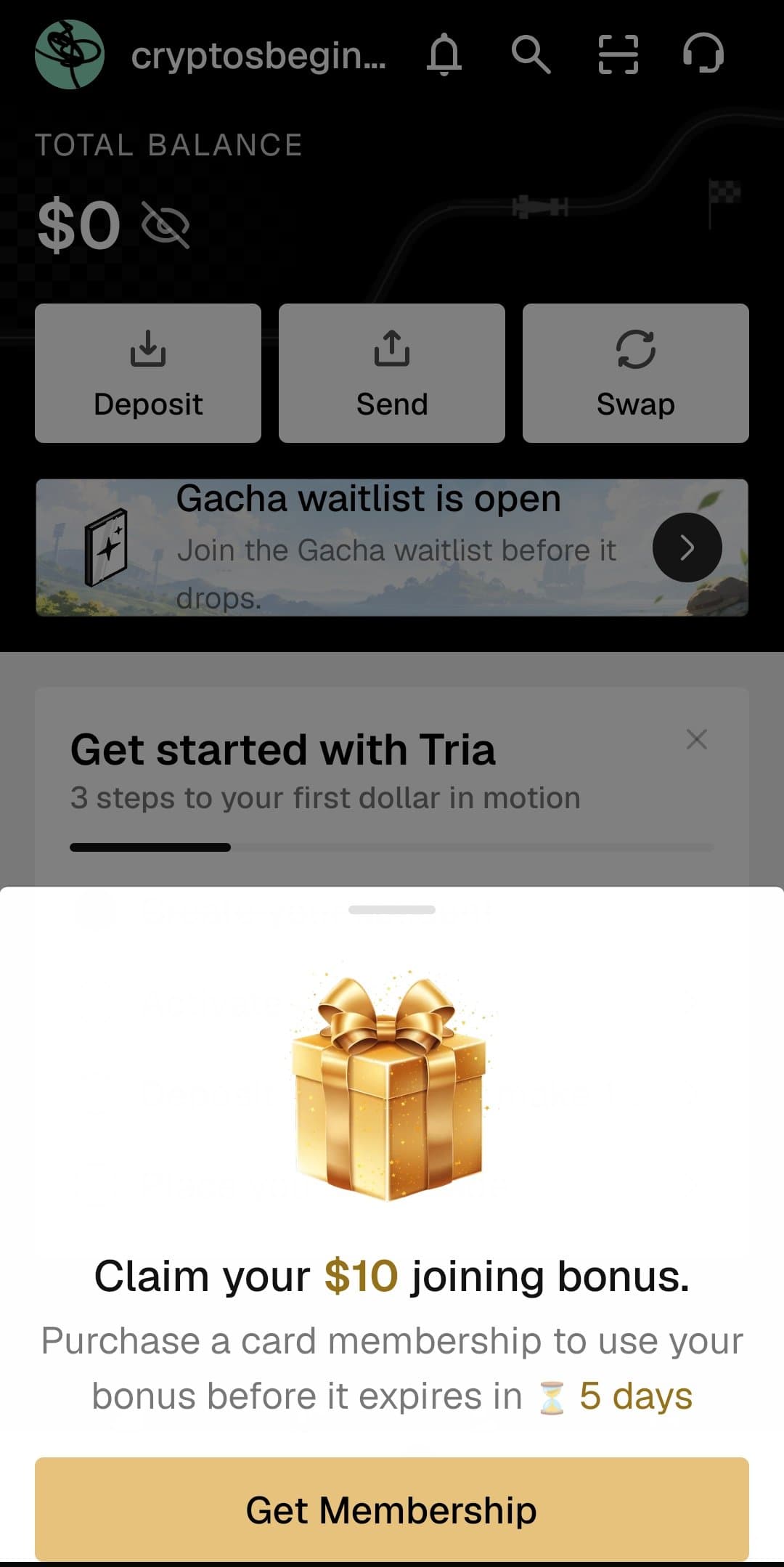
All tiers include a virtual card, spending up to 1M USD per day, price protection up to 2,000 USD, purchase protection up to 10,000 USD, plus Google Pay and Apple Pay. Pro and Max add a physical card, airport lounge access, Visa Luxury Hotels, and Visa concierge. Max upgrades the physical card to metal. Tria claims an annual card value of 500 USD plus on Lite, 2,000 USD plus on Pro, and 3,000 USD plus on Max, which are provider marketing figures, not guaranteed returns. The app showed a 10 USD joining bonus at the time we reviewed it, marked as expiring in 5 days in the screenshot, so treat that as a limited offer rather than a permanent perk.
Read the cashback caps before you pick a tier
The headline rates only apply to your first 1,000 USD (Lite and Pro) or 2,000 USD (Max) of monthly spend, then drop to 0.5% or 1% unlimited. Work out your real monthly card spend before paying for a higher tier: if you spend 800 USD a month, Lite at 20 USD a year may beat Max at 250 USD a year.
How to top up your Tria card
Top-ups add funds to your card by depositing crypto from your wallet. The deposit is converted and credited to your card balance, ready for immediate use. Most top-ups are processed near-instantly. Here is the exact flow from the app:
- 1
Open the Cards section
Navigate to the Cards section of your Tria app.
- 2
Tap Top-up
Hit the Top-up button to start funding your card.
- 3
Choose your wallet
Select the Tria Wallet or any supported external wallet.
- 4
Pick your token
Choose the token you wish to deposit.
- 5
Enter the amount
Type in how much you want to add. Minimums are 50 USD for Bitcoin and 10 USD for all other supported tokens.
- 6
Review your details
Tap Review to verify the token, network, and amount.
- 7
Swipe to confirm
Swipe to Top-up to finalize the transaction. Funds are usually credited near-instantly.
One quirk worth knowing: funds can be visible but not usable. Refunds in progress (posted charges) are merchant refunds still being processed by Visa, and merchant refunds can only be spent by using the card, never withdrawn. Blocked amounts (pending charges) are pre-authorizations from hotels, car rentals, or fuel pumps, released once the final transaction amount is confirmed.
Supported networks and minimums
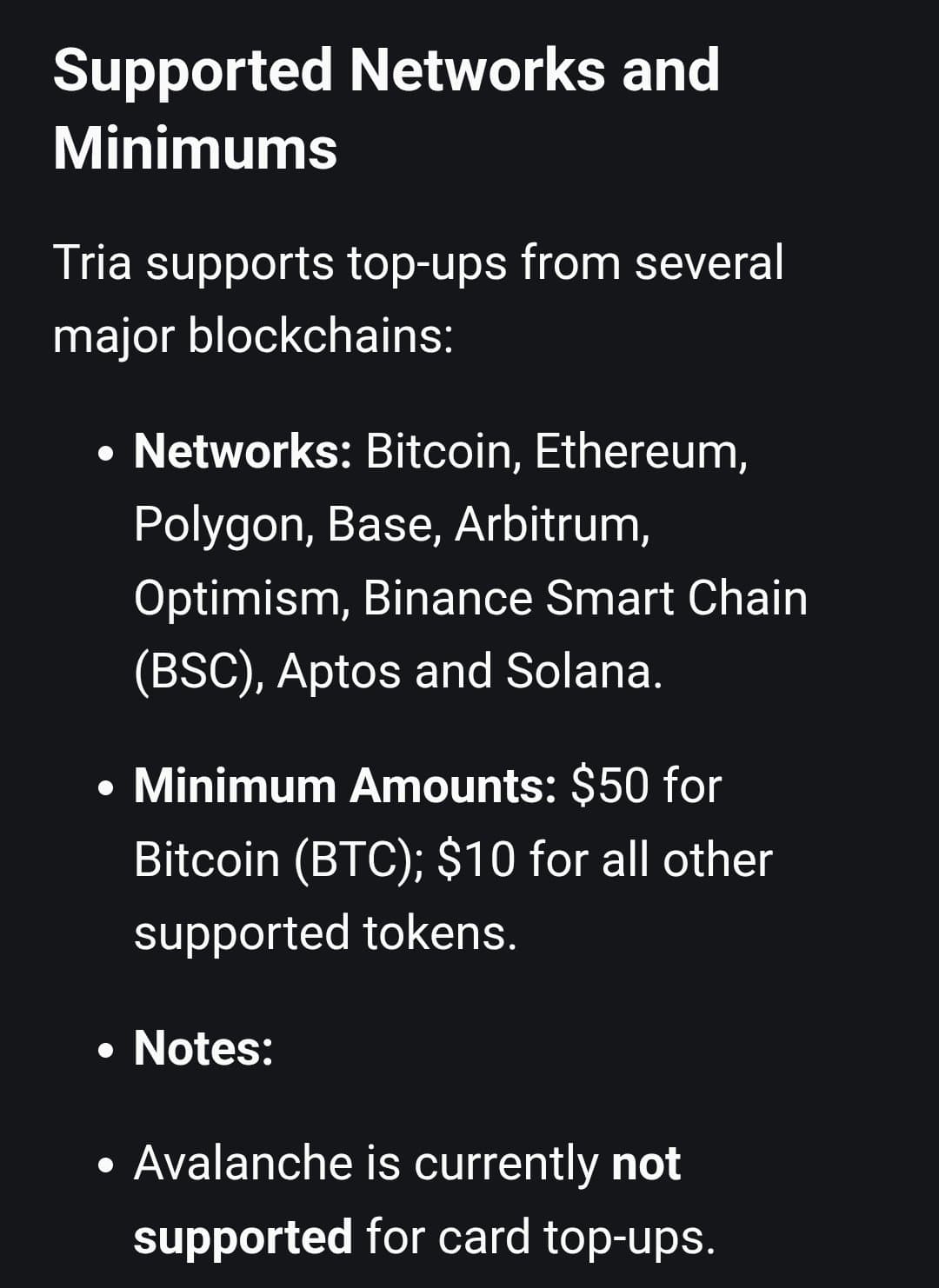
Tria supports card top-ups from nine blockchains: Bitcoin, Ethereum, Polygon, Base, Arbitrum, Optimism, Binance Smart Chain (BSC), Aptos, and Solana. Minimums are 50 USD for Bitcoin and 10 USD for all other supported tokens. Avalanche is currently not supported for card top-ups.
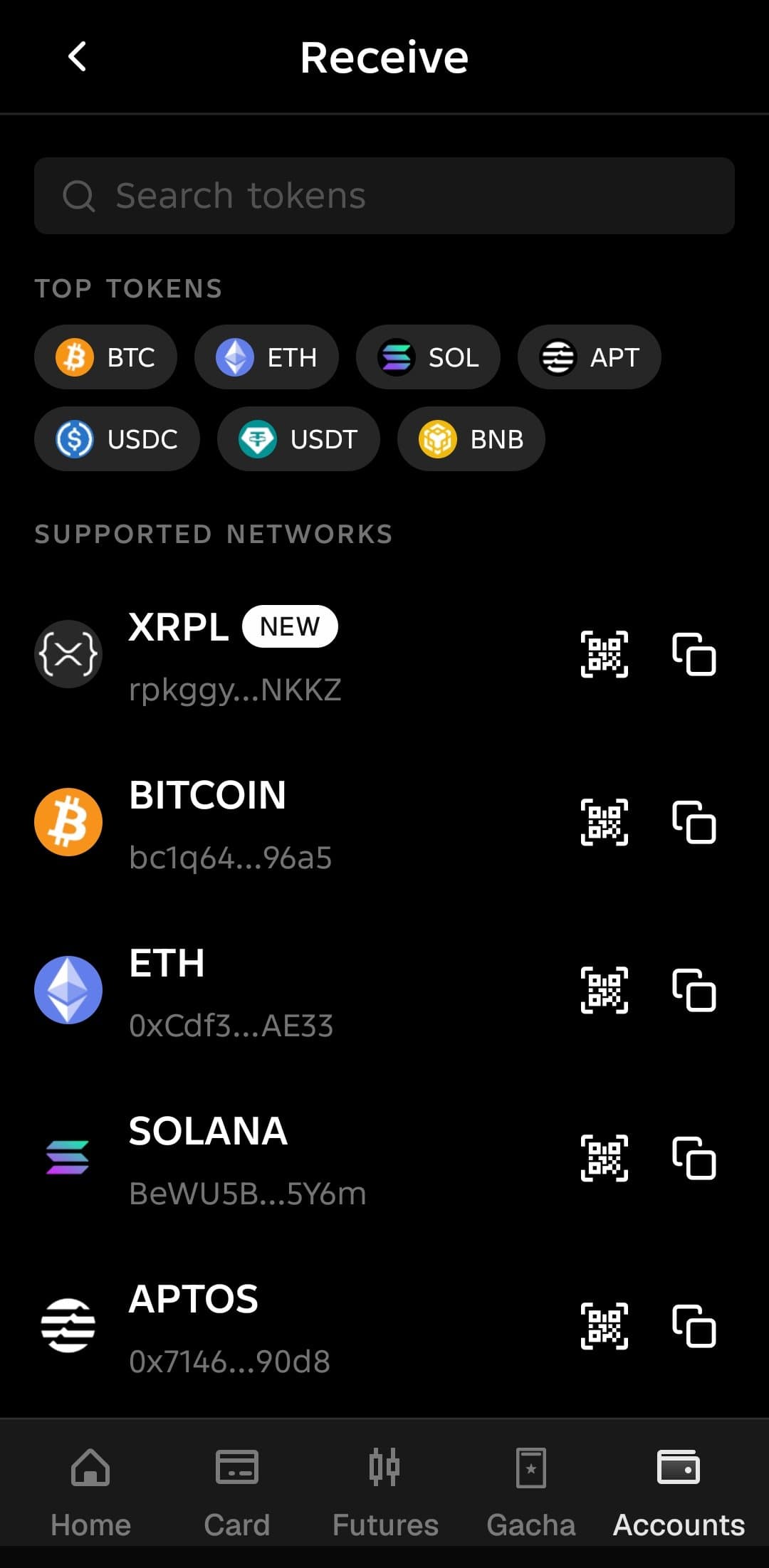
For most supported chains, Tria offers gasless deposits, meaning you do not need to hold the blockchain's native gas token to fund your card. The exception is Solana: gasless deposits are not supported there, so you must hold native SOL in your wallet to cover transaction fees or the deposit will fail. Also note that direct SOL deposits are not supported at all, SOL must first be converted to a supported currency before topping up. Deposit tokens in the app include BTC, ETH, SOL, APT, USDC, USDT, and BNB, with XRPL marked as new.
ATM withdrawals: fees, limits, and how to avoid failures
Withdrawing cash costs a 1 USD base fee plus 1% of the withdrawal amount, rounded down to the nearest cent. So a 100 USD withdrawal needs 102 USD in your balance: 100 plus 1 base plus 1 percentage. Tria's system limits are a maximum of 750 USD per transaction and a maximum of 3 withdrawals within a 24-hour period. The local ATM provider's own limits apply on top.
The critical detail: when the ATM prompts you to choose an account type, you must select Credit. Do not select Savings or Checking, as those options will typically result in a failed transaction. In Japan, withdrawals were confirmed to work at Seven Bank, E-net Bank, Lawson Bank, Japan Post Bank, and AEON Bank. Note that at Seven Bank you must select Credit and accept the ATM's exchange rate. Most Japanese ATMs impose their own cap of roughly 100,000 JPY (about 640 USD) per transaction, so your practical daily maximum in Japan is about 640 USD times 3 transactions.
Futures trading in the app
The Futures tab offers two DEX options: Decibel, marked New and in beta, and Hyperliquid, marked Current. You pick one and can switch anytime from the trading dashboard. A 0.1% trading fee is charged on every trade you execute, whether you open or close a position, whether the trade is profitable or not, and regardless of order type. Fees are calculated on the notional value of the trade, not on profit or margin, and are deducted in USDC.
Leverage goes up to 40x, with a slider from 1x upward. The app warns that selecting higher leverage increases your risk of liquidation. Decibel is flagged as in beta with limited pairs and lower liquidity, and it advertises potential airdrop, lower trading fees, and AMP points. Hyperliquid is positioned as the battle-tested option with deep liquidity and extensive pairs. Futures trading is high risk: the 0.1% fee on notional value adds up fast on leveraged positions, and liquidation can wipe out your margin.
Agentic trading keys
The settings screen includes an Agentic Trading section where you can create API keys so the Tria trading SDK can place orders for you. Hyperliquid Agent Keys have 3 slots, Decibel Delegate Keys are unlimited. Keys are shown once. Only create these if you understand API key security, because anyone holding your key can trade on your account.
What the app stores say
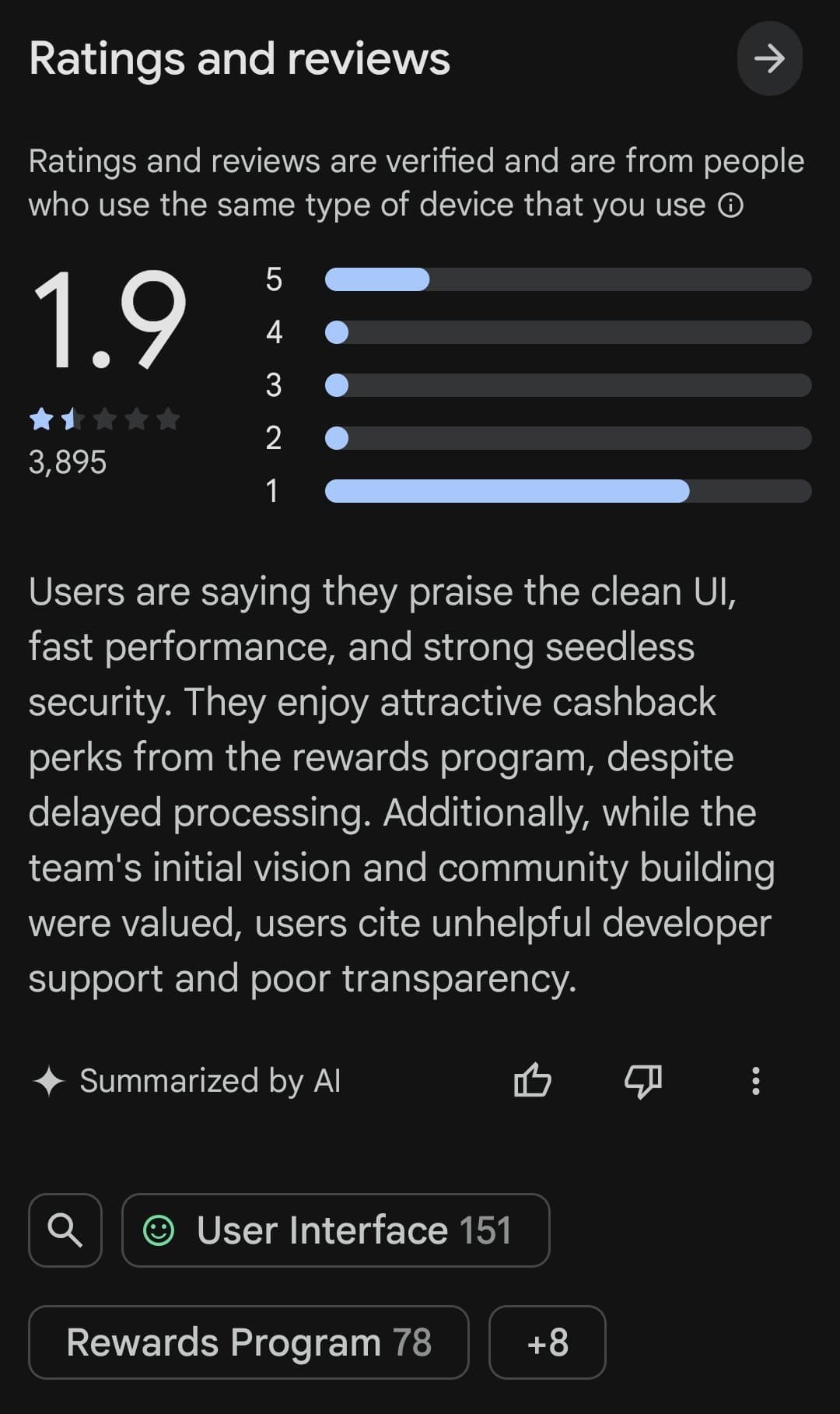
Ratings are split and worth reading carefully. On Google Play, Tria has a 1.9 star rating from about 3,895 reviews with over 100K downloads. On the App Store, it shows 3.5 stars, but from only 40 ratings, so that number is thin and not very informative.
Google Play's AI summary of reviews says users praise the clean UI, fast performance, and strong seedless security, and enjoy the cashback perks from the rewards program despite delayed processing. On the negative side, users cite unhelpful developer support and poor transparency. One review complains that the developers require mandatory updates almost every two or three days, which gets annoying when you need to check something quickly. As with any young fintech app, start small and test deposits and withdrawals before committing serious money.
How to sign up
Getting started takes a few minutes. Follow these steps in order:
- 1
Open our link
Start here: app.tria.so/?accessCode=IY97IDZRFP
- 2
Download the app
Get the Tria app for iPhone or Android.
- 3
Create your account
Tria sets up a self-custodial wallet where you hold the keys, not Tria, not a bank.
- 4
Pick a membership tier
Choose Lite, Pro, or Max and complete any required verification.
- 5
Fund your card
Go to the Cards section, tap Top-up, pick your token and network. The app showed a 10 USD joining bonus during our review.
Pros and cons
What stands out
- Genuinely self-custodial: you hold the keys
- Up to 6% cashback on Max, 4.5% on Pro
- Nine supported top-up networks
- Gasless deposits on most chains
- Apple Pay and Google Pay on all tiers
- Price and purchase protection included
- Futures trading via Hyperliquid and Decibel
- Airport lounge and Visa concierge on Pro/Max
What to watch
- Cashback caps: boosted rates only on first 1,000 to 2,000 USD/month
- Google Play rating is 1.9 stars from 3,895 reviews
- Users cite poor support and transparency
- Solana needs native SOL for gas, no gasless deposits
- Direct SOL deposits not supported
- Avalanche not supported for top-ups
- ATM withdrawals: 1 USD plus 1%, 750 USD max per transaction
- Self-custody means you are responsible for your keys
Verdict
Tria is the most interesting self-custodial crypto card we have reviewed. The combination of real self-custody, a Visa card accepted anywhere, and cashback up to 6% is genuinely rare. The membership math can work: if you spend 2,000 USD a month on the Max tier, the 6% boosted cashback covers the 250 USD annual fee several times over. The nine supported networks and gasless deposits on most chains make funding the card painless.
The honest concerns: the 1.9 star Google Play rating from nearly 4,000 reviews is a real signal, with users complaining about support and transparency. The cashback caps mean the headline rates only apply to your first chunk of monthly spend. And self-custody cuts both ways: nobody can freeze your money, but nobody can recover your keys either. For a self-custody believer who spends enough to justify a tier, Tria is worth a serious look. Start with Lite, test deposits and a withdrawal, and upgrade only if the numbers work for you.
Tria vs the alternatives
Tria is not the only crypto card we have tested on the real apps. Here is how it stacks up against five alternatives we reviewed hands-on, so you can see where your money goes furthest.
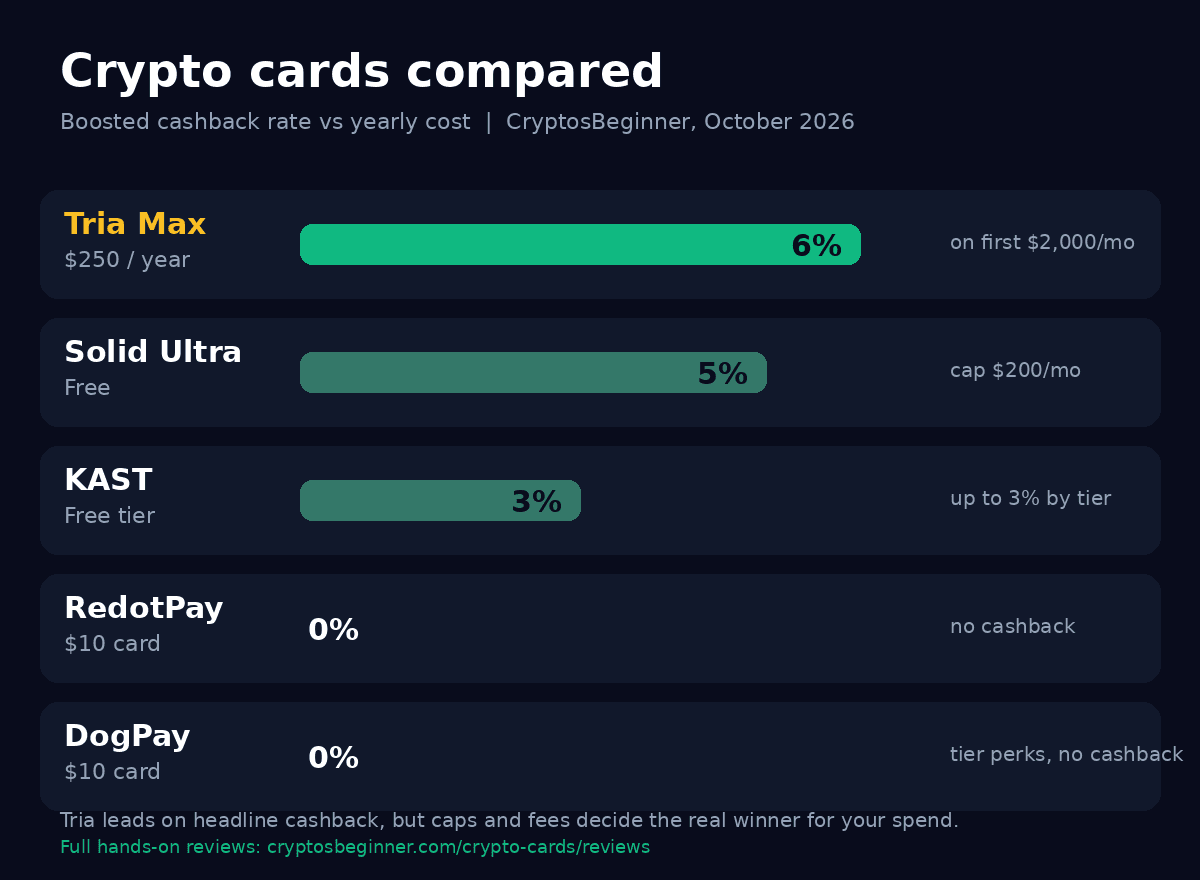
| Card | Yearly cost | Boosted cashback | Custody | Top-ups | Best for |
|---|---|---|---|---|---|
| Tria | 20 to 250 USD membership | Up to 6% on first 2,000 USD/mo, then 1% | Self-custodial, you hold the keys | 9 networks, gasless on most chains | Self-custody plus high-spend cashback |
| Solid | Free, no annual fee | 3% to 5% USDC, caps 50 to 200 USD/mo | Self-custodial throughout | USDC deposits, free top-ups | Free card with real cashback and yield |
| KAST | Free Standard tier | 1.5% to 3% by tier | Self-custodial Earn vaults | Stablecoin neobank | Free tier with earn on idle balance |
| RedotPay | 10 USD virtual card | None | App-managed | Stablecoins, free on-chain top-ups | Cheapest honest way to spend crypto |
| DogPay | 10 USD virtual, memberships to 29.80 USD/mo | None, tier perks instead | App-managed | USDT, USDC, DOGE, BTC, SOL, ETH | Multi-BIN Visa and Mastercard, USD account |
| Rizon | Free maintenance | RizPoints points program | App-managed | Stablecoin and USD services | Points chasers, metal tiers pending |
The quick read: Tria has the highest headline cashback at 6%, but only on the 250 USD a year Max tier and only on your first 2,000 USD of monthly spend. Solid pays up to 5% in USDC with no annual fee, which wins on pure math for moderate spenders. KAST gives you a free tier with self-custodial earn. RedotPay is the cheapest honest way to simply spend crypto, and DogPay is the toolkit pick with multiple BINs and a USD bank account. If self-custody is non-negotiable and you spend over 1,500 USD a month on card, Tria Max is the strongest of the self-custodial options.
Frequently asked questions
What is Tria?+
Tria is a self-custodial crypto neobank with a Visa card. Unlike most crypto cards where a company holds your funds, Tria gives you a wallet where you hold the keys: the app states not Tria, not a bank, only you. Every transaction needs your Face ID approval. You top up the card with crypto from supported networks, and the card spends anywhere Visa is accepted. The app also offers futures trading, an earn section, travel bookings, and a referral program.
Is Tria custodial or self-custodial?+
Tria is self-custodial. The account creation screen states clearly: you hold the keys, not Tria, not a bank, only you. Your money cannot be frozen or spent without you, and every transaction requires your Face ID approval with no exceptions. This is a genuine difference from most crypto card apps, which are custodial and hold your balance on their servers.
What are the Tria membership tiers?+
There are three tiers. Lite costs 20 USD per year and includes a virtual card with 1.5% cashback on your first 1,000 USD of monthly spend, then 0.5% unlimited cashback. Pro costs 109 USD per year and includes a plastic plus virtual card with 4.5% cashback on your first 1,000 USD of monthly spend, then 1% unlimited. Max costs 250 USD per year and includes a metal plus virtual card with 6% cashback on your first 2,000 USD of monthly spend, then 1% unlimited. All tiers include spend up to 1M USD per day, price protection up to 2,000 USD, purchase protection up to 10,000 USD, Google Pay, and Apple Pay. Pro and Max add a physical card, airport lounge access, Visa Luxury Hotels, and Visa concierge.
Which networks and tokens can I use to top up the Tria card?+
Tria supports card top-ups from nine blockchains: Bitcoin, Ethereum, Polygon, Base, Arbitrum, Optimism, Binance Smart Chain (BSC), Aptos, and Solana. Minimums are 50 USD for Bitcoin and 10 USD for all other supported tokens. Avalanche is currently not supported for card top-ups. Deposit tokens include BTC, ETH, SOL, APT, USDC, USDT, and BNB, with XRPL marked as new in the app. Note that direct SOL deposits are not supported: SOL must first be converted to a supported currency. Most chains offer gasless deposits, meaning you do not need the native gas token, except on Solana where you must hold native SOL for fees.
What are the Tria ATM withdrawal fees and limits?+
ATM withdrawals cost a 1 USD base fee plus 1% of the withdrawal amount. Tria system limits are a maximum of 750 USD per transaction and a maximum of 3 withdrawals within a 24-hour period. When the ATM prompts you to choose an account type, you must select Credit. Selecting Savings or Checking typically results in a failed transaction. In Japan, withdrawals were confirmed to work at Seven Bank, E-net Bank, Lawson Bank, Japan Post Bank, and AEON Bank. Japanese ATMs impose their own cap of roughly 100,000 JPY (about 640 USD) per transaction, so your practical daily maximum in Japan is about 640 USD times 3 transactions.
Does Tria offer futures trading?+
Yes. The app has a Futures tab with two DEX options: Decibel (marked New and in beta) and Hyperliquid (marked Current). A 0.1% trading fee is charged on every trade you execute, whether you open or close a position, whether the trade is profitable or not, and regardless of order type. Fees are calculated on the notional value of the trade and deducted in USDC. Leverage goes up to 40x. The app warns that higher leverage increases liquidation risk, and Decibel is in beta with limited pairs and lower liquidity.
What do app store reviews say about Tria?+
Ratings are split. On Google Play, Tria has a 1.9 star rating from about 3,895 reviews and over 100K downloads. On the App Store, it shows 3.5 stars but from only 40 ratings, so that number is thin. Google Play's AI summary says users praise the clean UI, fast performance, and strong seedless security, and enjoy the cashback perks, but cite unhelpful developer support and poor transparency. One review complains about mandatory app updates every two or three days. Start small and test deposits and withdrawals before committing serious funds.
How do I sign up for Tria?+
Open our link at https://app.tria.so/?accessCode=IY97IDZRFP, download the Tria app for iPhone or Android, and create your account. Tria sets up a self-custodial wallet where you hold the keys. Choose a membership tier (Lite, Pro, or Max), complete any required verification, then top up your card from the Cards section by selecting your wallet, token, and amount. The app showed a 10 USD joining bonus at the time we reviewed it.