Updated 14 October 2026 · Originally published 9 April 2025 · By Alex Rivera · Reviewed for CryptosBeginner
RedotPay Review 2026: Fees, Limits & Is It Worth It?
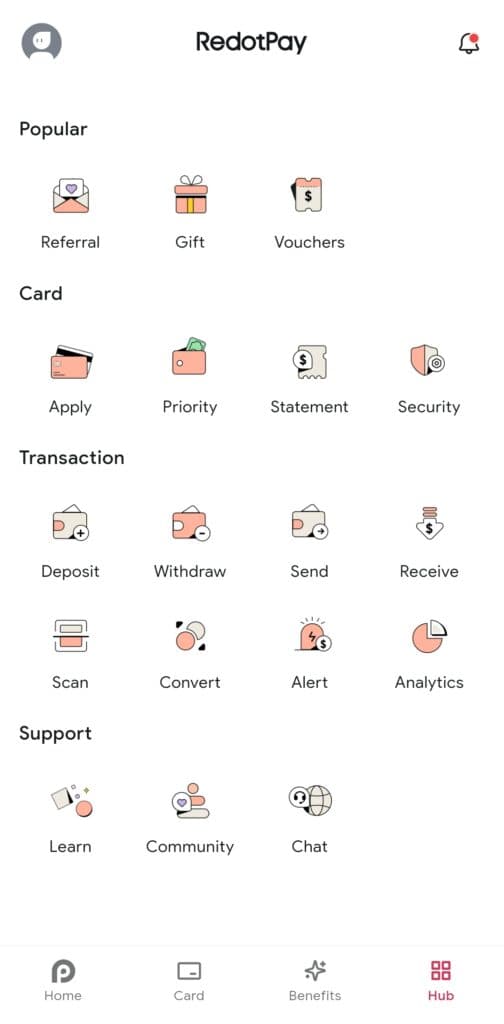
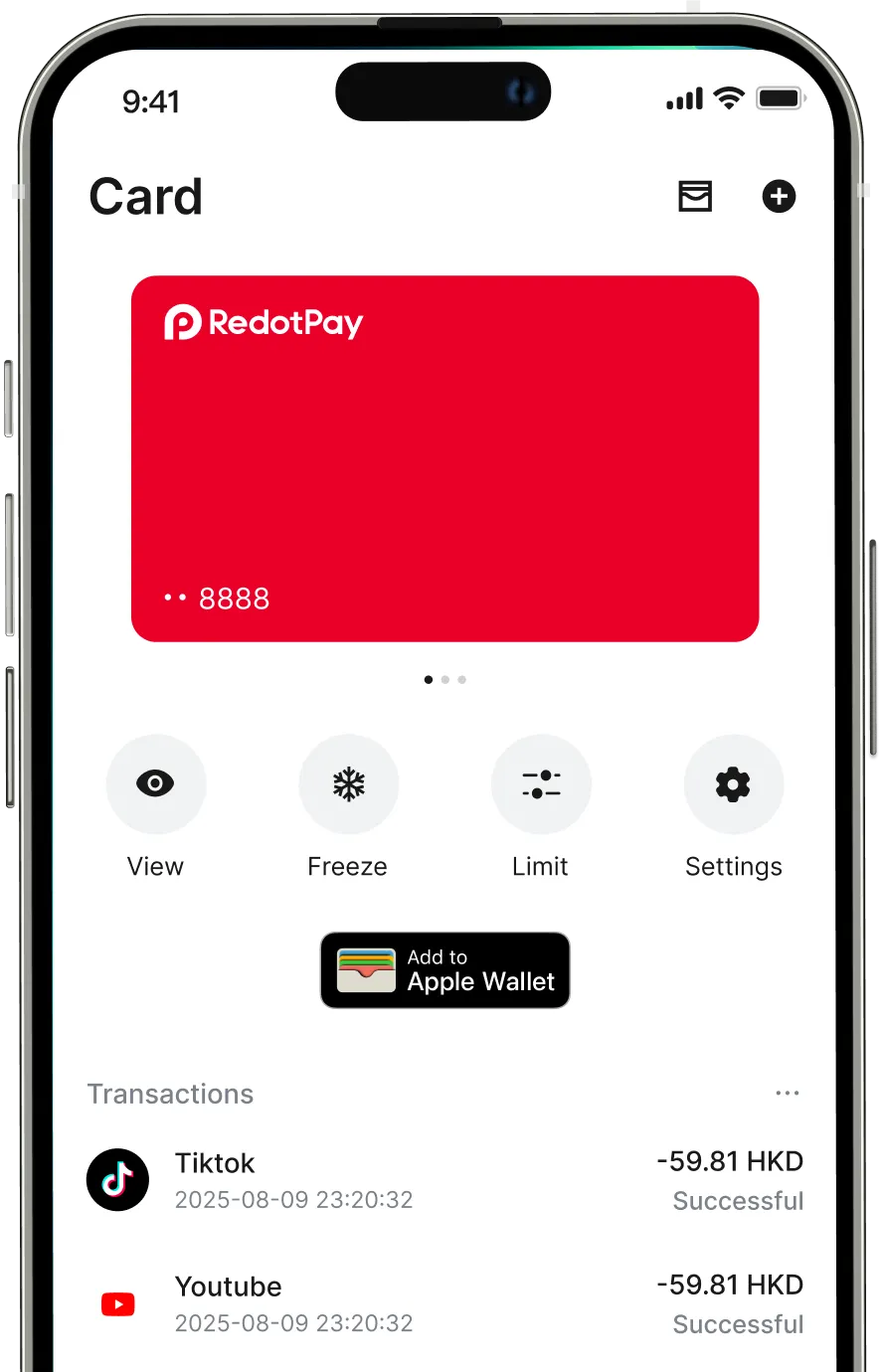
RedotPay is a crypto debit card that lets you spend your crypto anywhere regular cards are accepted. The pitch is simple: a $10 virtual card, no monthly fee, and 1% on USD spending. I dug through the fee schedule, the user ratings, and the fine print so you know exactly what it costs and where it falls short. Here is the full picture.
Alex Rivera · Crypto researcher, CryptosBeginner
Every review is research-led: specs, fees, and availability are checked against official sources before publication and re-checked on every update. Affiliate links never influence verdicts. Last reviewed 14 October 2026.
The short version
- A crypto debit card. Top up with crypto, spend in fiat. Your coins convert at the point of sale.
- Cheap to get started. $10 one-time for the virtual card, no monthly or annual fee.
- Spending fees are honest. 1% on USD purchases, 2.2% on non-USD purchases (verified October 2026).
- Full KYC required. Government ID plus selfie through Sumsub. This is never a no-KYC card.
- No cashback. Standard cards earn nothing back, so compare carefully with cashback cards.
- Not for US users. Available in 100+ countries, but the US is officially unsupported.
What RedotPay is
RedotPay is a crypto debit card, issued in both virtual and physical form. The idea is straightforward: you load the card with crypto from your own wallets, and when you tap or swipe, RedotPay converts the exact amount to fiat at the moment of purchase. To the shop, it looks like a normal card payment.
The company has grown fast. Third-party reviews in 2026 put the numbers at 6 million plus users and around $10 billion in annualized payment volume. On the security side, RedotPay is PCI DSS 4.0 certified, keeps custody through Fireblocks, and reviewers cite roughly $42 million in insurance coverage. It supports BTC, ETH, USDT, USDC, SOL, and more, across networks including TRC20, ERC20, BEP20, Polygon, Arbitrum, Solana, and Bitcoin.
One thing to say plainly up front: RedotPay is custodial. Your crypto sits with them once you top up, not in your own wallet. That makes it a spending account, not a savings account. Keep what you plan to spend there, and keep the rest somewhere you control.
How to sign up
Signing up is the easy part. The card itself only unlocks after identity verification, which is the next section.
- Click the RedotPay link on this page to open the signup page.
- Enter your email address and set a password, then confirm the email verification code they send you.
- Download the RedotPay app and log in with your new account.
- Before verification, you can look around the app, but you cannot order a card or top up yet.
How to complete KYC
Let me be direct about this, because it comes up a lot: RedotPay is not a no-KYC card and never has been. Before you can order any card, you complete full identity verification through Sumsub. Here is how it goes.
- In the app, tap through to the identity verification section to start KYC.
- Choose your country and select a government-issued ID: passport, national ID card, or driver's licence.
- Photograph the front and back of your ID in good light, making sure every corner is visible.
- Take the live selfie check so Sumsub can match your face to the ID.
- Submit and wait. Approval usually lands within minutes, though it can take longer if your documents are hard to read.
Higher verification levels unlock higher transaction limits, up to $100,000 per transaction and up to $1 million daily for the top tier. For most beginners, the basic level is plenty.
How to top up with crypto
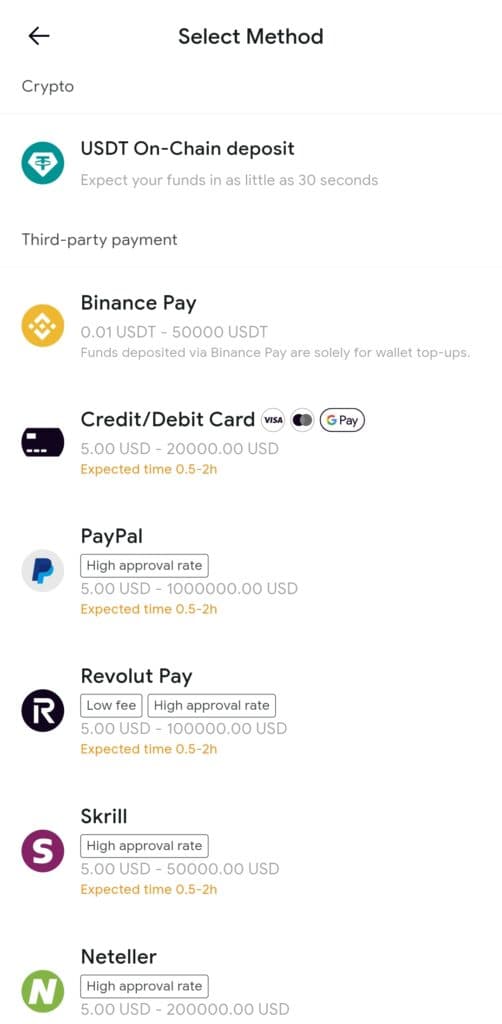
Top-ups are where RedotPay is genuinely friendly: on-chain crypto deposits are free. You send coins from your own wallet to your RedotPay deposit address, and the full amount lands on your card balance. No percentage cut, no fixed fee.
- Open the app, tap top up, and choose crypto deposit.
- Select the asset you want to deposit, for example USDT, and pick the network carefully (TRC20 is the cheap workhorse for USDT).
- Copy your RedotPay deposit address or scan the QR code.
- Send from your own wallet to that address. Start with a small test amount the first time.
- Wait for the network confirmations. Your card balance updates once the deposit is confirmed.
The network you pick matters more than the fee RedotPay charges, because RedotPay charges nothing here. Sending USDT over TRC20 costs a fraction of a dollar, while ERC20 can cost several dollars in gas. If you prefer funding from a bank card instead, expect a 3% top-up fee, or 1% via Binance Pay.
How to order the virtual card
The virtual card is the way most people start. It costs $10 one-time, there is no monthly or annual fee, and you can use it for online shopping and mobile wallets the moment it is issued.
- Finish KYC first. You cannot order any card before verification.
- In the app, go to the card section and choose the virtual card.
- Pay the $10 one-time issuance fee from your card balance.
- Your virtual card details appear immediately. Add it to Apple Pay, Google Pay, or Samsung Pay, or use the card number for online purchases.
A note on Apple Pay: RedotPay paused Apple Pay for newly issued cards in August 2025, but it has been restoring it as a free upgrade since January 2026. If yours does not link on the first try, check for an in-app upgrade option or contact support.
How to order the physical card
The physical card costs $100 one-time, again with no monthly or annual fee. That is steep for a piece of plastic, so it only makes sense if you want in-store taps and ATM access.
- Make sure KYC is fully approved and you have a verified address on file.
- In the app's card section, choose the physical card option.
- Pay the $100 one-time issuance fee from your card balance.
- Enter or confirm your shipping address carefully. Double-check it, because re-shipping a card is a hassle.
- Wait for delivery, then activate the card in the app when it arrives.
Honestly, most beginners should start with the $10 virtual card and see how much they actually use it before spending $100 on the physical one. You can always upgrade later.
How to spend with RedotPay
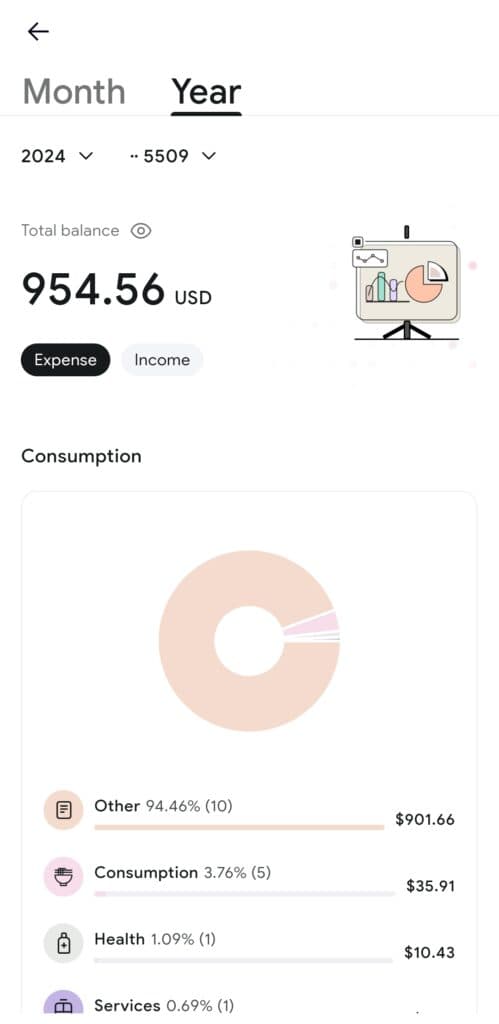
Spending is the part that just works. Once your balance is topped up, tap, swipe, or pay online like any debit card. The merchant gets paid in their local currency, and RedotPay converts your crypto to cover the exact amount at the point of sale. Your transaction history in the app shows every payment with the conversion details.
What you actually pay depends on the currency. USD merchant purchases cost 1% on top. Non-USD purchases cost 2.2% total: 1% crypto conversion plus a 1.2% FX markup. That is the honest headline number to remember when comparing cards.
ATM withdrawals: the weak spot
Let me be honest here, because the original review that this page builds on flagged it too: ATM withdrawals are RedotPay's weak spot. Only the physical card can use ATMs, withdrawals cost 2% of the amount, and on a non-USD withdrawal the fees can stack to around 4.2% all-in once conversion and FX are included. On top of that, the ATM operator itself may add its own surcharge.
If your plan is to live off crypto cash, a 2% haircut every time you touch an ATM gets old fast. RedotPay is at its best when you tap and pay at the shop counter, not when you pull cash out of a machine. Treat ATM use as an emergency option, not a daily habit.
Full fee table (verified October 2026)
Every figure below was checked against RedotPay's own published fee schedule and 2026 third-party reviews in October 2026. Fees can change, so always confirm in the app before you commit to the physical card.
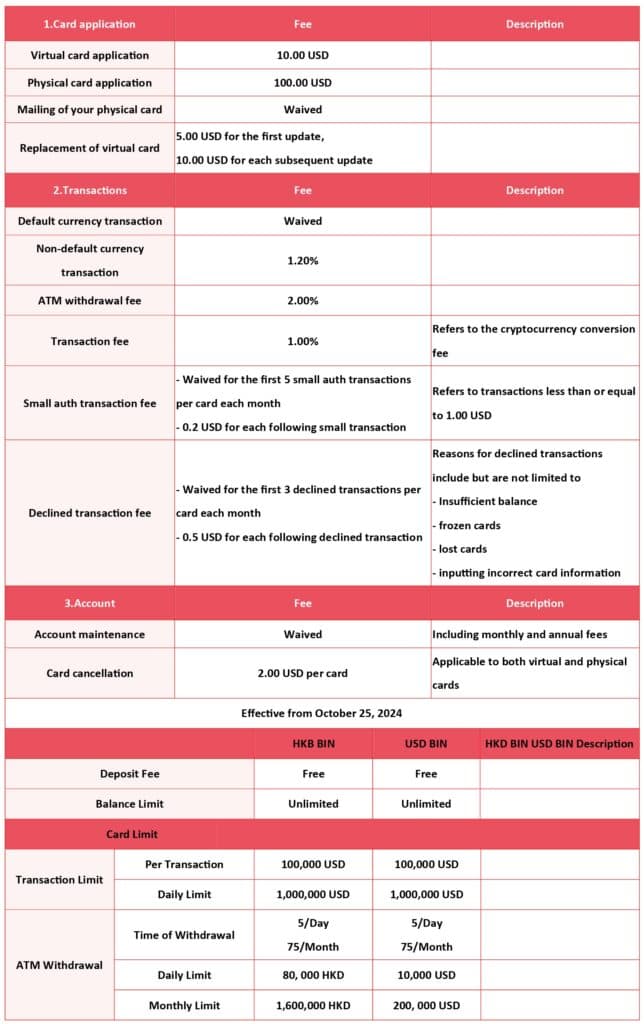
| Item | Fee |
|---|---|
| Virtual card issuance | $10 one-time |
| Physical card issuance | $100 one-time |
| Monthly or annual fee | None |
| USD merchant purchase | 1% |
| Non-USD merchant purchase | 2.2% (1% conversion + 1.2% FX) |
| ATM withdrawal (physical card) | 2% |
| Top-up with crypto (on-chain) | Free |
| Top-up with bank card | 3% |
| Top-up with Binance Pay | 1% |
| Small-transaction fee | $0.20 from the 5th swipe per month |
| Declined-transaction fee | $0.50 after 3 consecutive declines |
| Cashback | None on standard cards |
The small-transaction fee deserves a mention: from your fifth swipe in a calendar month, tiny purchases attract a $0.20 fee each. If you use the card for lots of small buys, like a daily coffee, those add up over a month. It is not a dealbreaker, but it is the kind of fee that only shows up in the fine print.
Video review
Prefer to watch? Here is our video walkthrough of the RedotPay card, covering signup, fees, and how spending actually works.
What users say: ratings
Our verdict is our own, but it is worth seeing how RedotPay scores on public platforms. These are third-party ratings, checked in October 2026, and they move over time.
| Platform | Rating |
|---|---|
| Trustpilot | ~3 out of 5 (~800 reviews, mixed) |
| Google Play | 4.5 out of 5 (68K+ reviews) |
| Apple App Store | 4.8 out of 5 (3,700+ ratings) |
The pattern is familiar for crypto cards: app users are mostly happy with the day-to-day product, while the smaller Trustpilot sample skews lower with complaints concentrated on support response times and the occasional blocked transaction. Read the negative reviews before you top up a large amount.
Pros and cons
Pros
- $10 virtual card, no monthly or annual fee
- Free on-chain crypto top-ups
- 1% fee on USD spending is genuinely competitive
- 100+ countries supported
- Apple Pay, Google Pay, and Samsung Pay support
- PCI DSS 4.0 certified with Fireblocks custody
Cons
- No cashback on standard cards
- Physical card costs $100 one-time
- 2% ATM fee, weak for cash users
- Small-transaction and declined-transaction fees add up
- Full KYC required, never a no-KYC option
- Not available in the US
Risks you should know
Custodial risk. Once your crypto is on RedotPay, it is in their custody. If the company has problems, your balance has problems. Only keep what you plan to spend, and keep your savings in a wallet you control.
Tax. In many countries, spending crypto is a taxable disposal. Every tap of the card can be a reportable event, which means keeping records. Check your local rules or talk to a tax professional before making the card your daily driver.
Fees stack up. 1% here, 2.2% there, $0.20 on small swipes, 2% at ATMs. Each one is small, but a heavy user who taps for everything and pulls cash regularly will feel the total. Run your own numbers against how you actually spend.
Blocked transactions. Like every card in this space, payments can occasionally be declined or flagged, and support response times get mixed reviews. Keep a backup payment method when you travel.
Verdict
RedotPay is a solid, honest crypto card for what it is: a cheap way to spend crypto on everyday purchases. The $10 virtual card is a low-risk way to try it, free on-chain top-ups keep your money whole until the moment you spend, and 1% on USD purchases is fair. The honest caveats are the no-cashback policy, the expensive physical card, the weak ATM story, and the nickel-and-dime small transaction fees.
If you spend mostly in dollars and pay at the counter rather than at the cash machine, RedotPay is genuinely worth a look. If you are in the US, want cashback, or live at the ATM, keep looking.
RedotPay questions
Is RedotPay legit and safe?
RedotPay is a real operating company with a growing user base (6M+ users cited in 2026 third-party reviews), PCI DSS 4.0 certification, and about $42M in insurance coverage cited by reviewers. It is custodial and uses Fireblocks for custody, so your crypto sits with them, not in your own wallet. It is a legitimate product, but custodial risk is real and you should only keep spending money there, never your savings.
Is RedotPay available in the US?
No. RedotPay is available in 100+ countries, but the US is listed as an unsupported country in RedotPay's own Help Center. If you are in the US, you cannot get a RedotPay card at the time of writing.
What are RedotPay's fees?
The virtual card costs $10 one-time and the physical card costs $100 one-time, with no monthly or annual fee. Spending costs 1% on USD purchases and 2.2% on non-USD purchases (1% conversion plus 1.2% FX markup). ATM withdrawals cost 2%. Top-ups are free with on-chain crypto, 3% with a bank card, and 1% with Binance Pay. There is a $0.20 fee from your 5th small swipe each month and a $0.50 declined-transaction fee after 3 consecutive declines. Fees verified October 2026.
Does RedotPay require KYC?
Yes, full KYC is required before you can get a card. You go through Sumsub verification with a government-issued ID and a selfie. There is no anonymous or no-KYC route, and anyone telling you otherwise is wrong.
Does RedotPay offer cashback?
No. Standard RedotPay cards have no cashback program. If cashback is the reason you want a crypto card, look elsewhere.
Which cryptocurrencies can I spend on RedotPay?
RedotPay supports BTC, ETH, USDT, USDC, SOL, and more, across networks including TRC20, ERC20, BEP20, Polygon, Arbitrum, Solana, and Bitcoin. When you pay, your crypto is converted to fiat at the point of sale.
Can I use RedotPay with Apple Pay or Google Pay?
Yes. RedotPay supports Apple Pay, Google Pay, and Samsung Pay. Apple Pay for newly issued cards was temporarily paused in August 2025, but RedotPay has been restoring it as a free upgrade since January 2026.