Tools · trading extensions
Frontrun Review 2026: the overlay that pays 90% of its fee back
Updated 29 November 2026 · Originally published November 2026 · Reviewed for CryptosBeginner
Frontrun is a browser extension that lives inside Axiom, GMGN, Terminal and X. It labels the wallets behind the trades, shows you who is really behind an X account, and adds its own trade panel with a 1% fee that comes back to you as 90% cashback. This review covers how it works, what the paid plans actually add, where the cashback fine print bites, and how it stacks up against the terminals it sits on.
Affiliate disclosure: Some links on this page are affiliate links. CryptosBeginner may earn a commission if you register through one. This does not change our assessment criteria or conclusions. This page is educational content, not financial advice.
Alex Rivera · Crypto researcher, CryptosBeginner
Every review is research-led: specs, fees, and availability are checked against official sources before publication and re-checked on every update. Affiliate links never influence verdicts. Last reviewed 29 November 2026.
TL;DR: our take
- Best for: active Solana and BNB Chain traders who already live in Axiom, GMGN or Terminal and follow traders on X. Frontrun makes the tools you have smarter instead of asking you to move.
- The headline: a 1% trading fee with 90% cashback, so roughly 0.1% effective before priority fees and tips. No other major terminal gives back anywhere near that share.
- The intelligence is the product: wallet labels that follow you across platforms, smart followers, deleted-post contract history and linked wallets on X profiles. The trading panel is good; the labels are why people install it.
- Main caveats: cashback eligibility is not fully documented, paid plans are pricey for casual traders, there is no published third-party security audit, and the terms cap liability at $100.
- Not ideal for: beginners, mobile-first traders, and anyone who wants a standalone terminal rather than an overlay.
Video review
Watch: Frontrun review
Our video review walks through Frontrun in a live browser: the labels appearing on a terminal, the X profile insights, placing a trade from the Instant Trade panel, and the rewards dashboard where the cashback lands.
On this page
What is Frontrun?
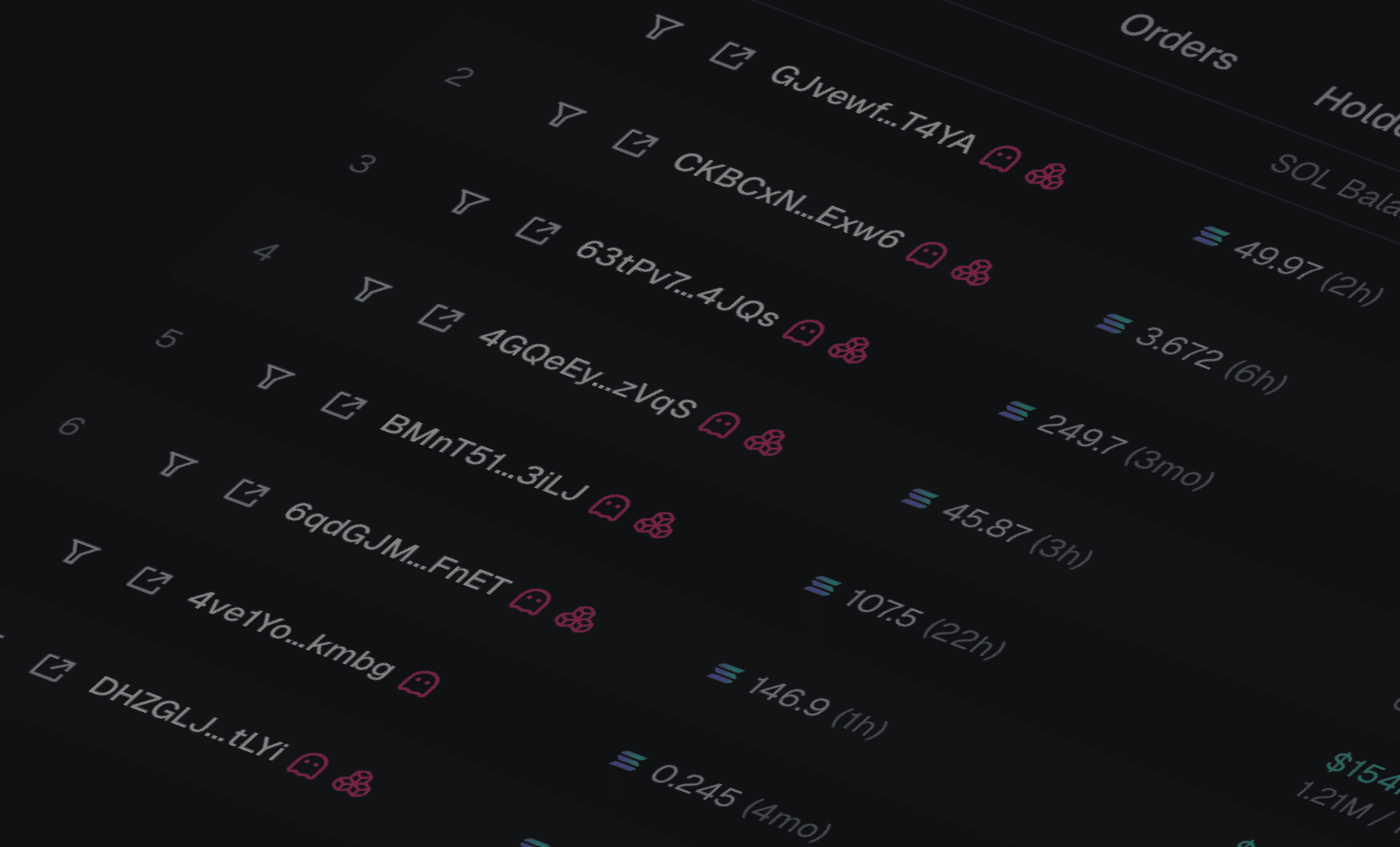
Most trading tools ask you to move house. A new terminal, a new wallet, a new set of labels to build from zero. Frontrun takes the opposite approach: it is a browser extension that moves into the house you already live in. Install it, open Axiom, GMGN, Terminal (Padre) or DexScreener as usual, and the pages gain extra furniture. Wallets in the holders list carry labels. An Instant Trade panel appears on token pages. Open X and profiles gain a panel showing the wallets linked to that account, the contract addresses it has posted (including from posts it later deleted), and which smart accounts follow it.
The company behind it is Wifhat, Inc., a Delaware corporation, and the backers are not lightweights: Alliance and YZi Labs both invested, and the founding team includes engineers from Robinhood Crypto and Mysten Labs, the Sui developer. Frontrun says the extension has passed 90,000 Chrome users. Treat that as a company figure; the Chrome Web Store listing was showing around 40,000 users in October 2026 coverage, so the truth is somewhere in that range and growing.
It started life as an intelligence tool, and some older reviews still describe it as read-only. That is out of date. Frontrun trades now: market and limit orders on Solana and BNB Chain, automated take profit and stop loss, multi-wallet trading, and a bridge to TON, which is in beta. The intelligence is still the reason to install it. The trading is what makes the cashback possible.
Getting started, step by step
1. Install the extension. Add Frontrun from the Chrome Web Store (it also lists Firefox and Edge builds) and pin it. Sign in with email or a social account; that login is what syncs your labels and settings between machines.
2. Sort out a wallet. Frontrun creates a wallet for you through Turnkey, with no seed phrase to write down, or you can import an existing wallet by private key in the sidepanel. If you import, use a trading wallet, not the wallet that holds your long-term bags. That rule applies to every hot trading tool, not just this one.
3. Fund it. Send SOL to the wallet address for Solana trading, or BNB for BNB Chain. TON is funded differently: bridge SOL inside the sidepanel (it routes through ChangeNow and Frontrun quotes 60 to 90 seconds) or import a TON wallet.
4. Set your presets before you trade. Open the trading settings and set your P1, P2 and P3 quick-buy amounts, slippage, and fee mode. Use Auto Fee unless you have a reason not to; it adjusts the priority fee to conditions instead of you guessing a fixed number in a fast market. Settings persist per chain, so do this once on Solana and once on BNB Chain.
5. Trade from the page you are on. Open any token on Axiom, GMGN, Terminal or DexScreener and the Instant Trade panel is there. Pressing the I key opens it fast. For a limit order, toggle Market to Limit in the panel and set a target price or market cap, or enable the right-click chart option in settings and place the order straight off the chart.
6. Claim your cashback. Cashback accrues on trades made through Frontrun and is claimed from the rewards dashboard, as SOL, or as subscription credits worth 30% more. Claim it regularly. Frontrun's terms give you one year from earning it to submit a payout request, after which unclaimed amounts can expire.
Features that matter
Wallet labels that follow you. This is the core of the product. Frontrun maintains a label database covering KOLs, VCs, insiders, smart money and known bad actors, and applies those labels everywhere: X, Axiom, GMGN, Terminal, Solscan. The exact size of the database depends on which page of Frontrun's site you read, the FAQ says over 100,000 pre-labeled wallets while the pricing page and store listing say 6M+ labels, so treat the big number as marketing and the smaller one as the floor. Either way, the practical value is real: a label you create or import once shows up on every platform, instead of dying inside whichever terminal you made it in. You can also import existing labels from GMGN, Axiom and Solscan so you do not start over.
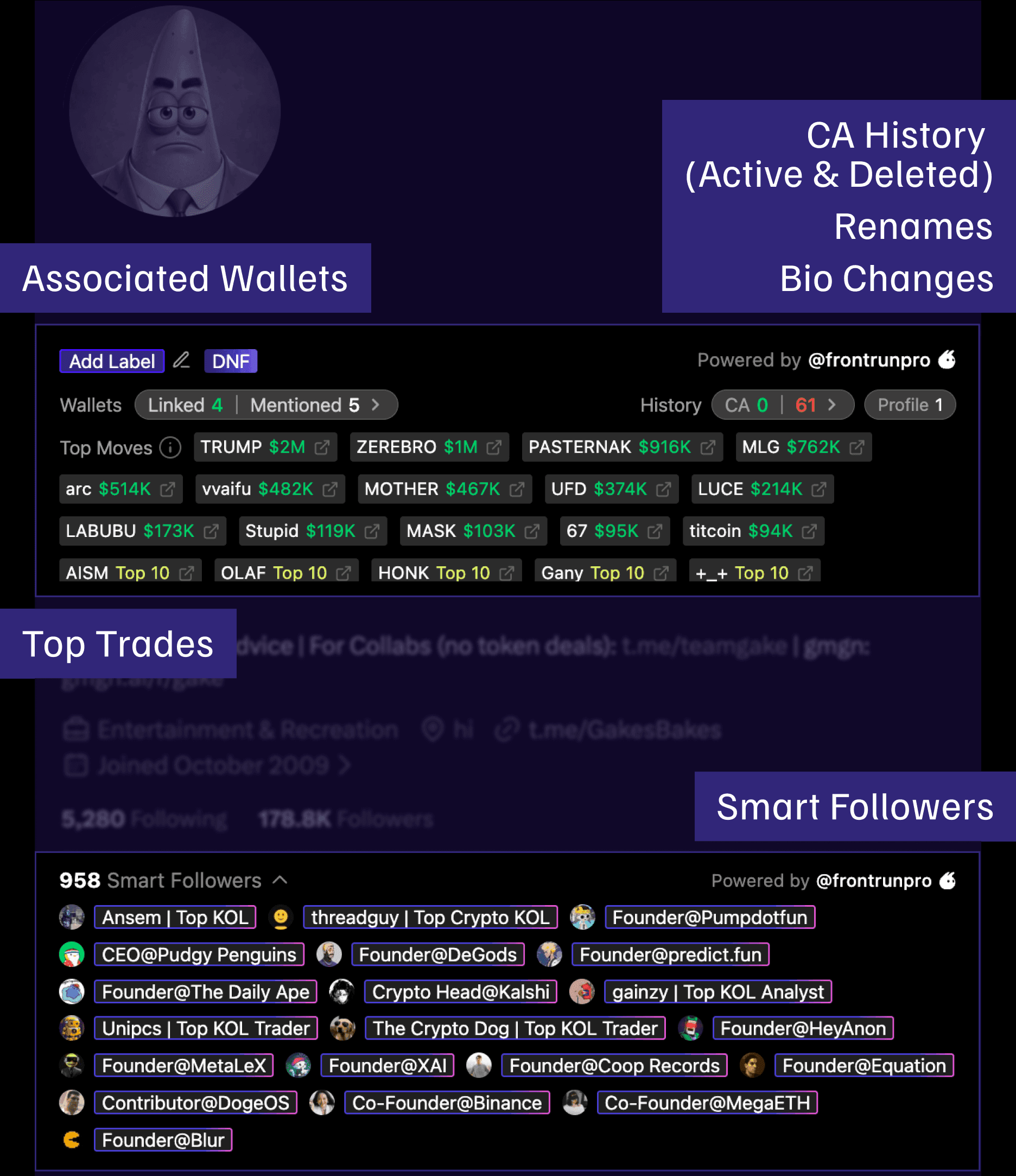
X Insights. Open a trader's X profile and Frontrun shows the wallets associated with the account, its full contract address history including addresses from deleted posts, rename and bio change history, top trades, win rate and PnL, and a Smart Followers list: the notable accounts that follow this one, labeled. If you have ever watched a KOL call a token, delete the post, and deny it later, you already understand why the deleted-post history matters. The newer Trader Location Labels feature flags accounts whose stated location and actual signals do not match, which is aimed squarely at VPN-farmed personas.
Instant Trade and limit orders. The trade panel supports market and limit orders with per-preset slippage, priority fee, tip and MEV mode. Limit orders can be placed three ways: right-clicking the chart on Axiom, GMGN or Terminal (off by default, turn it on in settings), the panel's Market to Limit toggle, or through AutoTrade. One honest gap: there is no dedicated sniping tool in the documentation. The speed story is quick-buy presets, Auto Fee and the hotkey, not a purpose-built sniper.
AutoTrade. Take profit, stop loss and trailing stop loss that you can arm at the moment you buy, or bolt onto a position you already hold. There is also a dev-sell reaction on Solana: if the developer wallet of a token you hold sells, Frontrun can auto-sell or auto-buy your position in response. Anyone who has held a token through a dev dump will see the appeal, and the limit: a reaction is only as good as the liquidity left when it fires.
Multi-wallet trading. Create wallets and wallet groups from the selector and trade with several at once, including splitting a sell across wallets by percentage. There is also a tidy-up feature that consolidates token accounts so you can one-click sell tokens you originally bought through other bots such as Akbot or TradeWiz.
The rest. Buy by percentage of wallet balance, trade quoted in USDC while amounts display in SOL, wallet share cards for posting a wallet's 7-day PnL and win rate, trending accounts and tokens, a FOMO tracker, and, on the Gold plan, API access to the Twitter and wallet intelligence data.
Fees and the 90% cashback, in detail
Every major Solana terminal charges the same sticker price: 1% per trade. Frontrun charges 1% too. The difference is what comes back. Padre returns 10% of its fee as cashback by default, up to 35% if you were referred at the top rate. Bloom and Trojan land in a similar 10 to 20% band. Frontrun returns 90%.
| Cost item | What Frontrun charges |
|---|---|
| Trading fee | 1% per swap, the same sticker price as Axiom, GMGN and Photon |
| Cashback | 90% of the fee back, claimed as SOL, or as subscription credits with a 30% bonus |
| Effective fee | About 0.1% after cashback, before network and speed costs |
| Network, priority fees and tips | Charged separately and set by you, or by Auto Fee. These are not cashbacked away |
| Deposit and withdrawal fees | None published. Wallets are self-custodial, so moving funds is an ordinary on-chain transfer |
| Current promotion | Frontrun markets 120% cashback: the 90% in SOL plus 30% more if you take credits. Trading volume also earns free plan months, $6,250 of volume for a free Silver month and $15,000 for Gold |
Is the cashback actually paid, or is it points and promises? The strongest evidence we found is from Lucidity Academy, a trading course that teaches Frontrun and shows its author's own rewards dashboard: $29,019.15 of lifetime cashback received, at the 90% rate. That is one heavy user's account, not an average, but it is a real dashboard from a named third party rather than Frontrun's own marketing.
Now the fine print, because there is some. Frontrun's documentation does not define precisely which trades are eligible for cashback, and the terms say cashback must be claimed within a year of earning it. Cashback also only accrues on trades executed through Frontrun itself; the labels work everywhere, but trades you place natively in Axiom earn nothing back. And the 0.1% figure is the platform fee only. In a fast market your priority fee and tip can cost more than the platform fee you saved, which is an argument for Auto Fee and against hero-sized tips on every buy.
Pricing plans
Trading and cashback are free. What the paid plans sell is intelligence depth and usage limits, priced in the open on Frontrun's pricing page:
| Plan | Price | What you get |
|---|---|---|
| Free | $0 | Baseline daily and weekly credits, core X features, access to the wallet label database, trending accounts, and trading with up to 90% cashback |
| Silver | $75 per month | 3x usage limits, full customisation of features, trending accounts two hours earlier, label export, earliest-followers view, more smart followers, and Smart Tags |
| Gold | $180 per month | 10x usage limits, a Frontrun badge on X, API access to the intelligence data, and exclusive alpha features |
Two things worth knowing before you pay. First, the smart way in is free: trade on the free plan, and if you do want Silver, the cashback you take as credits comes with a 30% bonus, which is Frontrun effectively discounting its own plans for active traders. A 30% first-payment sale ran from 23 to 27 November 2026, which is why Silver showed at $52.50 for a first month during that window. Second, the terms are blunt that subscription payments are non-refundable, and a renewal can be charged to your wallet in the 24 hours before the period ends if auto-renew is on. Set a reminder before your first renewal date.
Pros and cons
Strengths
- 90% fee cashback is in a league of its own; the effective fee of about 0.1% undercuts every major terminal
- Labels and X intelligence work inside the tools you already use, no migration
- Deleted-post contract history and linked wallets catch behaviour KOLs would rather hide
- Full trading stack on top: limit orders, take profit, stop loss, trailing stops, multi-wallet
- Non-custodial Turnkey wallets, no seed phrase, keys exportable, extension code open source
- Free plan is genuinely usable, including cashback on trades
Weaknesses
- Cashback eligibility rules are not fully documented, and unclaimed cashback can expire after a year
- Silver at $75 and Gold at $180 a month are steep for anyone not trading daily
- No published third-party security audit; the transparency case rests on the open-source build
- Terms cap the company's liability at $100 and make subscriptions non-refundable
- Desktop browser only in practice; no mobile app, and TON support is still beta
- Marketing sometimes outruns the product, including a GTA VI giveaway post that drew an X Community Note
Safety, custody and the terms
Frontrun's custody model is the modern embedded-wallet one. New wallets are created through Turnkey, which generates and stores keys inside its own secure infrastructure and signs transactions there; Frontrun states it never has access to your private keys or the ability to move funds on your behalf, and markets this as a zero key access architecture. It is the same provider Axiom uses. Imported wallets are the other route, and there the responsibility is yours: a private key pasted into a browser extension should belong to a trading wallet with limited funds, full stop.
On transparency, Frontrun does one thing most competitors do not: it publishes the exact Plasmo build it ships to the Chrome Web Store on GitHub and explains every permission the extension requests. What it does not have is a named third-party security audit. The open-source build is a real check, but it is not the same as an audit, and the review would be dishonest if it blurred that line.
The terms deserve a skim before you fund anything, because a few clauses matter in real life. Frontrun itself warns that labels and analytics can be incomplete, delayed or wrongly attributed, and that a label does not verify anyone's identity. Stop losses are explicitly not a guarantee of a maximum loss. Signing out, closing the browser or uninstalling the extension does not cancel server-side orders; each order has to be cancelled individually. With delegated signing on, a permitted transaction can be signed without asking you again, including while you are offline. And the liability cap is $100, with the service provided as is. None of this is unusual for the category, all of it is worth knowing before your first deposit rather than after your first surprise.
Frontrun vs Axiom, GMGN, Photon and Padre
The comparison is slightly unfair by design, because Frontrun is not really competing with these terminals; it runs on top of three of them. But traders choose where their fees go, so the fee table is the honest way to compare:
| Tool | Type | Trading fee | Cashback |
|---|---|---|---|
| Frontrun | Browser extension overlay | 1%, about 0.1% effective after cashback | 90% of fees back |
| Axiom | Web terminal | 1%, falling to 0.75 to 0.95% on volume tiers | Tier based, well below Frontrun's rate |
| GMGN | Web terminal | 1% | No comparable headline cashback |
| Photon | Web terminal | 1% on buys and sells | No comparable headline cashback |
| Padre (Terminal) | Web terminal, now owned by Pump.fun | 1% flat, no tiers | 10% by default, up to 35% via referral, locked at sign-up |
Read the table the right way. If you trade inside Axiom because you love its trenches, Frontrun does not ask you to leave; it asks you to route the same trades through its panel on the same page and keep 90% of the fee. GMGN remains Frontrun's closest rival on the intelligence side, with its own smart money tracking and copy trading, and plenty of traders run both. What none of the terminals give you is the X layer: labels, deleted post history and smart followers inside the social app where the calls actually happen. One name to leave out of your shortlist: BullX, which older comparison articles still list, halted trading in June 2026 and has not relaunched.
Our full reviews of the terminals: Padre (Terminal), GMGN, and the Axiom guide.
Tips for getting the most out of Frontrun
Start free, upgrade with cashback. The free plan trades and earns cashback. Run it for a few weeks, watch your credit usage, and only upgrade if you are actually hitting limits. If you do upgrade, pay with cashback credits and the 30% bonus stretches them further.
Claim cashback on a schedule. Put a monthly reminder on it. The terms give you a year to claim before amounts can expire, and money sitting unclaimed in a dashboard is money at platform risk.
Let Auto Fee drive. Fixed priority fees are either too high in quiet markets or too low in hot ones. Auto Fee adjusts per trade, and on a tool whose whole pitch is fee efficiency, hand-setting a fat tip on every buy defeats the purpose.
Arm your exits when you enter. Set take profit and stop loss in AutoTrade at buy time, not after the position moves. And remember the terms' warning in reverse: signing out does not cancel those orders, which is what you want while they are working for you, and something to check individually when you close a position manually.
Treat labels as leads, not proof. Frontrun's own terms say labels can be misattributed. Before you size into a trade because a wallet is labeled smart money, open it on Solscan and look at the actual history. Thirty seconds of checking has saved more accounts than any label database.
Import your old labels on day one. If you have months of labels built up in GMGN, Axiom or Solscan, import them instead of starting cold. The network effect of your own research is half the product's value.
Keep a separate trading wallet. Fund the Frontrun wallet with what this week's trading needs and sweep profits out. That habit matters more than any single security feature, on every tool in this category.
Who it suits, and who should skip it
Frontrun suits the trader who already has a workflow: a terminal they like, a set of accounts they follow on X, and a fee bill at the end of the month that makes them wince. For that trader the pitch is unusually clean, because nothing about the workflow has to change. The labels make the existing research faster, the X panel answers the "who is this account really" question in one click, and the cashback quietly refunds most of the cost of trading.
Skip it if you are new to on-chain trading. An overlay that surfaces smart money labels can make a beginner feel informed while they are really just following other people's exits; learn manual spot trading first, ideally with our paper trading simulator. Skip it if you trade mainly from your phone, because there is no mobile app. And skip the paid plans if you trade a few times a week; the free tier plus cashback covers that usage comfortably, whatever the upgrade prompts imply.
Verdict
Frontrun is the rare trading tool that does not demand you change how you trade. It makes the terminals you already use more honest, by showing you who is behind the wallets and the X accounts, and it makes them cheaper, by handing 90% of its fee back. The intelligence layer is the real product and it is genuinely differentiated; nobody else puts deleted-post contract history and smart follower labels inside X itself.
The reservations are about polish and paper, not concept. Cashback eligibility should be documented properly, the paid plans are priced for professionals, an independent audit would strengthen a safety story that currently leans on open source and Turnkey's reputation, and the marketing team occasionally writes cheques the product team has to cash. None of that stops the free plan being an easy recommendation for active Solana and BNB Chain traders: install it, keep your terminal, and let the fee come back to you.
FAQ
Frontrun questions
What is Frontrun?
Frontrun is a browser extension for on-chain traders. It sits on top of the platforms you already use, mainly Axiom, GMGN, Terminal (Padre), DexScreener and X, and adds two things: intelligence, in the form of wallet labels, smart follower data and contract address history on X profiles, and an Instant Trade panel that lets you buy and sell without leaving the token page. It trades on Solana and BNB Chain, with TON support in beta.
How much does Frontrun cost?
Trading costs a 1% fee per swap, and Frontrun returns 90% of that fee as cashback, which brings the effective fee to roughly 0.1% before network fees, priority fees and tips, which are charged separately. The extension itself is free. Optional paid plans add intelligence features and higher usage limits: Silver is $75 a month and Gold is $180 a month. You do not need a paid plan to trade or to earn cashback.
Is the 0.1% fee real?
Mostly, with fine print. The sticker fee is 1%, the same as Axiom, GMGN and Photon. The difference is the 90% cashback, paid in SOL from the rewards dashboard, or worth 30% more if you take it as subscription credits. Frontrun's own documentation does not spell out exactly which trades count as eligible, and its terms give you one year to claim cashback before it can expire. Priority fees, tips and network costs are on top, so your true all-in cost is higher than 0.1% on fast trades.
Is Frontrun safe? Does it hold my keys?
Frontrun is built to be non-custodial. New wallets are created through Turnkey, the embedded wallet provider Axiom also uses, and Frontrun states it never has access to your private keys. The extension build it ships is open source on GitHub, so the code can be inspected. That said, no third-party security audit is published, the terms cap the company's liability at $100, and with delegated signing enabled a permitted transaction can be signed without a fresh confirmation, including while you are offline. Keep trading balances modest, as with any hot wallet tool.
Does Frontrun replace Axiom or GMGN?
No, and that is the point of it. Frontrun is an overlay, not a terminal. Your charts, trenches and token pages stay in Axiom, GMGN or Terminal. Frontrun adds the labels, the X profile intelligence and its own trade panel on top, and your labels follow you from one platform to another instead of being rebuilt in each tool.
Which chains and browsers does Frontrun support?
Trading runs on Solana and BNB Chain, and TON trading is in beta, funded by bridging SOL inside the extension or importing a TON wallet. Frontrun lists the extension for Chrome, Firefox and Edge. In practice most of the community, and most reviewers, run it on Chrome on desktop. There is no mobile app.
Disclaimer: Educational content only. This page is not financial, investment, legal, or tax advice. On-chain trading, especially in memecoins, involves a real risk of losing everything you put in. Cashback rates, plan prices and features change; verify the live terms on Frontrun's own site before depositing funds or paying for a plan. Availability of linked third-party sites depends on their own terms.